
Create Profile Block
The Create Profile block creates a new browser profile based on the current (source) profile. You can set a name for the new profile, choose to keep or change the proxy, and decide whether to delete the source profile after cloning.
Method
Clone
Clones the current profile into a new profile with the same configuration - including fingerprint settings, cookies, and extensions.
Profile Name
Set a name for the newly created profile. You can use expressions containing dynamic data to generate flexible names - for example, appending a timestamp or loop index.
Delete Current Profile
Delete the current (source) profile after the clone is complete.
Delete Profile Data Folder
This option is always disabled by default, meaning the source profile's browser data will not be deleted from your computer even if the profile itself is removed from Omnilogin.
Keep Proxy from Current Profile
Use the same proxy configuration from the source profile for the new profile.
Change Proxy for New Profile
Enter new proxy information to assign a different proxy to the cloned profile instead of using the source profile's proxy.
Practical Example
Suppose you want to create a new profile from the current one, keep the source profile, and use the same proxy:

Configure the Create Profile block as follows:
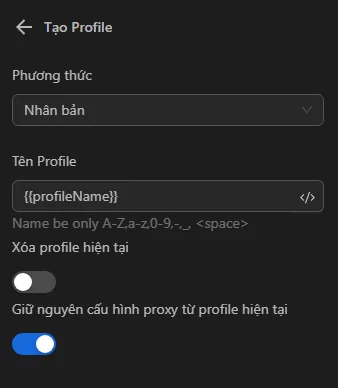
After running the workflow, a new profile is created successfully:
Use Cases
- Scaling accounts - Quickly duplicate a fully configured profile (with extensions, cookies, and settings) to create multiple similar accounts.
- Template profiles - Set up one "master" profile with your preferred configuration, then clone it whenever you need a new profile.
- Rotating proxies - Clone a profile but assign a different proxy to each clone for IP diversity.
Tips
- Use the Delete Current Profile option in loops where you want to replace the old profile with a refreshed clone on each iteration.
- Combine with the
Loop Datablock to bulk-create profiles from a list of proxy configurations.