
Global Data
Global Data is workflow-level storage that lets you define reusable values accessible from any block in the workflow. Instead of hardcoding the same value in multiple blocks, define it once in Global Data and reference it everywhere.
Single-value data
Example: you have multiple Open URL nodes where the URL input shares the same domain: https://www.etsy.com/. Instead of editing each node individually to change the URL domain, you can define the URL domain in Global Data like this:
{
  "url": "https://www.etsy.com/"
}
Access the data inside the URL text field of the Open URL node using expressions. For example: {{globalData.url}}
Complex data
You have a dataset containing a list of Facebook account usernames and passwords and you want to log into each account using a different profile. To do this, follow these steps:
First, you need to prepare a data file containing the columns profileId, key
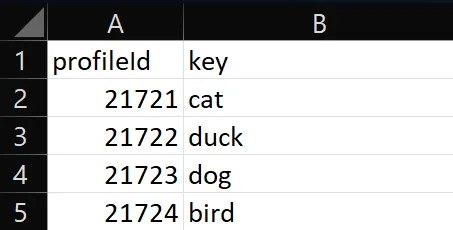
Then import the file into the main data by following these steps: first, write profileId into the primary column field during import, then upload the data file
Then use the syntax {{globalData.[profileId].key}} when entering the key to search
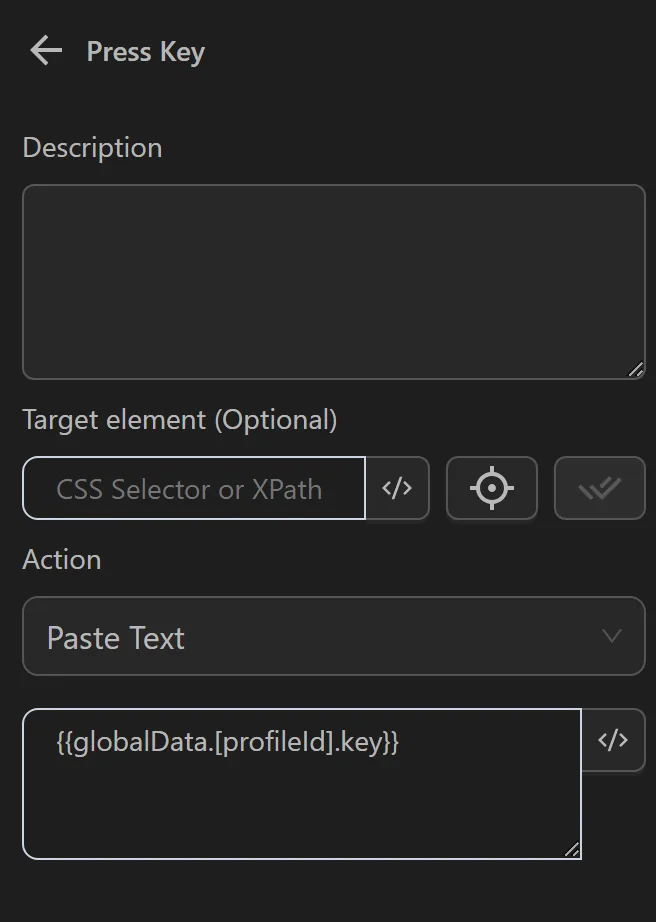
Finally, after running the process with multiple profiles, the corresponding keyword will be used in the corresponding profile